


Draw Animation - Anim Creator
Banix Studio
Turning a rough sketch into a moving scene is the kind of idea that sounds simple until you try to make it feel natural. Draw Animation - Anim Creator takes that basic pleasure and puts it into an approachable Android art app: you draw, build movement from your own artwork, and watch a still idea become something with timing and personality. I found the first sessions immediately satisfying because the result appears quickly, even when the drawing itself is very simple.
That quick reward is important. Many drawing applications ask you to spend time learning brushes, layers, palettes, and export settings before anything feels finished. This app is more direct. It is aimed at people who want to experiment with animated sketches rather than create a full illustration workflow. Banix Studio has positioned it in the Art & Design category, and the store summary describes its central appeal well without telling the whole story: the real attraction is not just drawing, but seeing a line, character, or small scene gain life through motion.
I would recommend trying it if you enjoy visual ideas, short creative exercises, or making playful animations for yourself. I would be more cautious if you need professional production tools, highly controlled frame management, or a complete replacement for a desktop animation program. Its strength is the low barrier between an idea and a moving result. Its weakness is that the same simplicity can become limiting once your projects demand precision.
What the first week feels like
A fast path from sketch to movement
During the first week, the app’s biggest advantage is momentum. You can begin with a basic drawing instead of preparing an elaborate project. A bouncing ball, blinking face, waving hand, or walking stick figure is enough to understand the appeal. The creative loop feels more inviting than opening a complex illustration suite because the goal is movement, not visual perfection.
I found this especially useful for testing ideas that would normally remain in a notebook. If I wanted to see whether a character’s expression worked, I could focus on a few visual changes instead of polishing a complete image. That makes the app suitable for beginners, casual artists, students, and anyone who likes learning through small experiments. The first successful animation does not need to be impressive; it only needs to show that your drawing can communicate an action.
Latest News

Uber Eats Under Pressure: What Happens When Delivery Goes Wrong

How QR & Barcode Scanner Adapts to Android and iOS Innovations

Why Waze Navigation & Live Traffic Is Your Essential Travel Companion

CapCut Mastery: Unleash Hidden Features for Pro-Level Editing

How OS Updates Enhance Roblox Adventures

Teacher Simulator: Exam Time Turns Quick Classroom Judgments into a Repetitive Loop
The app is free to download, with optional in-app purchases ranging from $1.49 to $19.99 per item. That makes the initial trial relatively easy to justify, although I would still advise spending time with the free experience before buying anything. A creative tool earns its place through repeated use, not through the excitement of its first afternoon.
Why simple subjects work best at the start
A useful beginner workflow is to animate one clear action at a time. Draw a stationary object first, then change only the part that needs to move. For example, a waving character is easier to understand when the body stays consistent and the arm changes gradually. This approach also exposes a common problem early: if too much changes between moments, the animation can feel like a sequence of unrelated drawings rather than one continuous action.
That is one of the app’s quiet teaching benefits. It encourages you to think about spacing, anticipation, and repetition without presenting a formal animation lesson. I learned more from recreating a simple bouncing object than from trying to begin with a crowded scene. The smaller the project, the easier it is to notice whether the movement is too fast, too abrupt, or missing a convincing pause.
Gallery
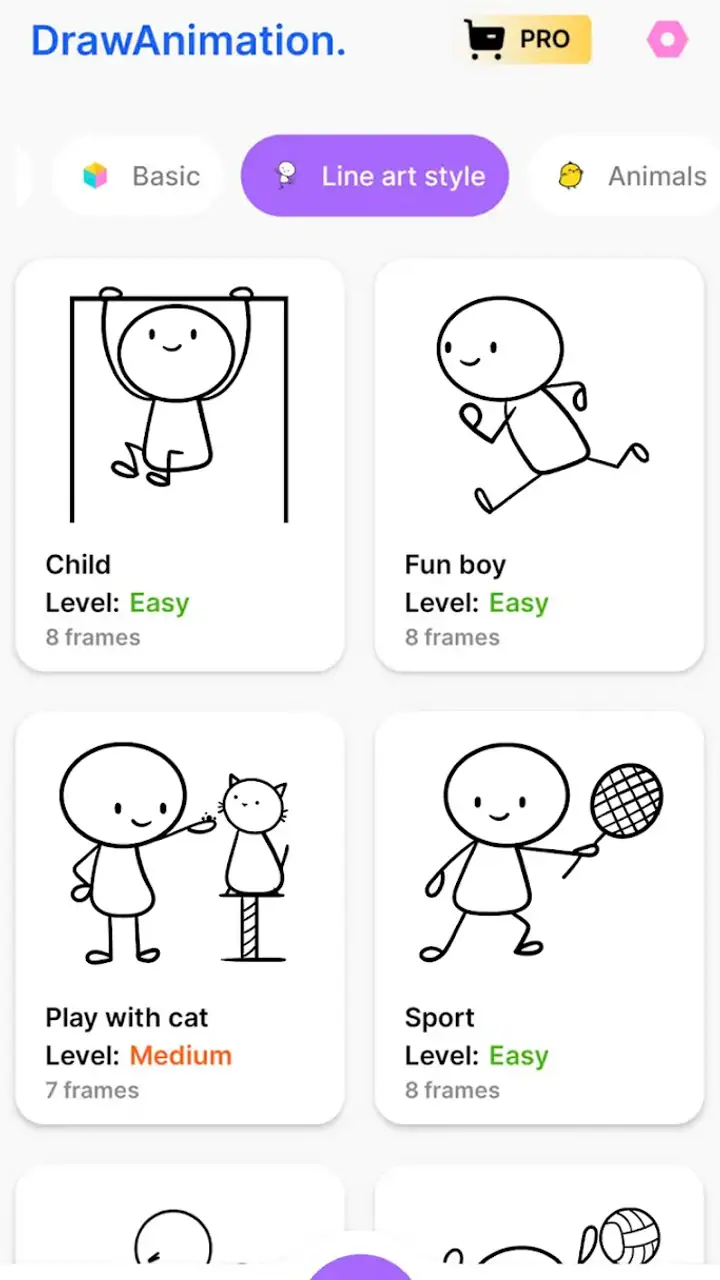
Another practical tip is to save versions before making major changes. Creative apps often make experimentation feel harmless, but a promising motion can be lost when you redraw too aggressively. Keeping a basic version gives you something to return to when a more ambitious edit becomes messy. This matters particularly for new users who are still discovering how much detail their own workflow can comfortably handle.
Who gets the strongest first impression
The app is a natural fit for people who already doodle on their phone and want those doodles to do something. It can also work for parents or teachers looking for a gentle way to introduce the idea of animation, provided the user is comfortable with the available drawing process. Its content rating is Everyone, which matches the broad, non-specialized nature of the tool.
It is less convincing for someone whose main goal is detailed digital painting. A painting app with advanced brush control may be the better choice if texture, color correction, or illustration finish matters more than movement. Likewise, a dedicated animation package may suit you better if you need a carefully organized production with many interacting elements. This app’s first-week appeal comes from reducing friction, not from matching every capability of a specialist tool.
What remains useful after the novelty fades
Small creative habits are its best long-term use
After the first week, the question changes from “Can I animate a sketch?” to “Why would I return tomorrow?” In my experience, the answer is strongest when the app becomes part of a small habit. A five-minute exercise can be enough: animate a blinking symbol, give a doodled animal a short reaction, or turn a handwritten idea into a moving visual note. These projects are modest, but they create a reason to open the app that does not depend on starting a major animation.
This is where the product has more lasting value than a one-time novelty toy. It makes visual practice feel approachable. Someone who finds traditional drawing apps intimidating may be more willing to return when the goal is a tiny moving sketch rather than a finished illustration. The motion itself becomes feedback: you can see whether a pose reads clearly, whether an expression changes enough, and whether a visual joke lands.
I also see potential for quick storyboarding. Before spending time on a larger creative project, you can use rough animated sketches to test an entrance, a gesture, or the timing of a reaction. The drawings do not need to be beautiful. Their job is to answer a practical question: does this action make sense when viewed in sequence? That makes the app useful for idea development even when the final artwork will be made elsewhere.
A good companion, not a complete art studio
The long-term trade-off is that the app’s focused nature can become restrictive. If your projects grow from short sketches into layered scenes with demanding edits, you may begin wishing for a more expansive toolset. That does not make the app unsuccessful; it clarifies its role. I would treat it as a sketchbook with motion rather than as the only creative application on a device.
Compared with a standard drawing app, its advantage is immediate animation. A normal canvas may offer more freedom for still artwork, but it does not automatically help you judge timing or movement. Compared with a full animation editor, this app is easier to approach, but likely less suitable for complex production planning. The best choice depends on what you are trying to finish. For a moving idea, this app is more direct. For a polished illustration or a large animation, another tool may eventually be necessary.
One of the more useful ways to combine it with other tools is to separate thinking from finishing. Use this app to explore the action and visual rhythm, then move to a more specialized editor only if the concept proves worthwhile. That prevents you from investing hours in detailed artwork before knowing whether the movement communicates. It also gives the app a recurring purpose even when it is not the final destination for every project.
Questions about cost and device support
The free price makes the app easy to test, while the optional purchases mean that some users may eventually encounter paid additions or upgrades. I would not make a purchase simply because the first animation feels exciting. Instead, use the app for several separate projects and ask whether you are returning for a real workflow or merely repeating the same first trick.
On the Android side, it supports devices running Android 6.0 or later. That broad requirement makes it accessible to people who are not using a recent phone, although the experience can still depend on the screen, performance, and comfort of the individual device. Drawing on a small display is convenient for quick ideas but can feel cramped when you need careful lines. A stylus or larger screen may improve control, but I would view that as a comfort choice rather than a reason to expect desktop-level precision.
The app has reached over ten million installs, with an average rating of 4.5 from around sixty-one thousand ratings and roughly one thousand written reviews. Those figures suggest that the concept has found a substantial audience, but they do not replace personal testing. People use animation apps differently: a casual doodler may be delighted by the same simplicity that frustrates an experienced animator.
Maintenance, repetition, and the points where fatigue appears
The real maintenance burden is creative, not technical
Keeping this app useful does not require a complicated routine. The harder part is maintaining a supply of small ideas. Once you have made a few basic loops, the novelty can weaken if every project follows the same pattern. I found that the best defense is to set a narrow prompt before opening the app: show weight, create a reaction, repeat one gesture, or make a still object appear alive.
That kind of constraint sounds limiting, but it reduces decision fatigue. Instead of browsing through possibilities, you begin with a specific animation problem. It also makes progress easier to notice. A project about a character turning their head teaches different lessons from a project about a bouncing object, even if both use simple drawings.
Another maintenance habit is to keep projects intentionally short until the idea has earned more time. Long sequences are tiring to redraw and harder to repair when one section feels wrong. A short loop can be adjusted repeatedly without turning the process into a chore. If the action still feels interesting after several revisions, then expanding it makes more sense.
Where repeated use can become tiring
The main source of fatigue is the gap between a charming first result and the patience required for smoother movement. A rough animation can be funny because of its imperfections, but a more convincing sequence demands consistency. Repeating a character’s proportions, preserving a background, and making changes gradually can take more effort than the playful interface initially suggests.
Screen size is another practical limitation. On a phone, quick strokes are comfortable, but detailed corrections may become slow. If you are animating a face or a small object, tiny inconsistencies can be visible, and correcting them repeatedly may make the process feel less spontaneous. I would use a larger device when possible for longer sessions, while keeping the phone for short studies and idea capture.
There is also a motivational limit. Users who want instant, polished results may lose interest when their early animations look rough. The app lowers the technical entry barrier, but it cannot remove the underlying work of observing movement and refining drawings. That is a fair trade-off, though it means the product rewards curiosity and practice more than passive consumption.
When another option is the better choice
Skip this app if your priority is professional illustration control, complex scene management, or a highly structured animation pipeline. In those cases, a specialist animation application or a desktop workflow will probably save time once the project becomes serious. You may also prefer a conventional drawing app if you rarely animate and mainly want finished still images.
On the other hand, do not dismiss it simply because you already own a more powerful tool. Powerful software often creates its own resistance: too many controls, too many setup decisions, and too much pressure to make every project worthwhile. This app can serve as a low-pressure place to test an idea before moving it into a demanding environment. That is a genuine recurring use, not just a beginner compromise.
My long-term verdict
Developed by Banix Studio, Draw Animation - Anim Creator earns lasting space most convincingly as a lightweight animated sketchbook. Its first-week appeal is clear: the distance between drawing and motion is short, and a basic idea can become a visible action before enthusiasm disappears. Its month-to-month value depends on whether you enjoy making small visual studies, storyboards, loops, or playful messages rather than expecting a complete professional studio.
I appreciate that the app makes animation feel approachable without pretending that good movement requires no effort. The best results come from working in short loops, changing one element at a time, and saving before major experiments. Those habits turn the app from a novelty into a useful practice tool. They also reveal its limits early, which is helpful when deciding whether to continue or move a project into more advanced software.
My honest recommendation is to install it if you want a friendly way to animate doodles, test visual ideas, or build a small creative routine on Android. Give it several different sessions rather than judging it from one impressive first result. If you still find yourself inventing reasons to open it after the initial excitement fades, it has earned a permanent place in your creative rotation.
If your needs center on polished still artwork, demanding frame control, or elaborate production management, choose a more specialized alternative instead. For everyone else, the balance is appealing: free access, an Everyone age rating, and enough immediacy to make experimentation feel worthwhile, with optional purchases available when the basic experience no longer covers your needs. The app is not the final answer to every animation task, but it is a convincing place to begin—and, for the right user, a tool worth keeping.
FAQs for Draw Animation - Anim Creator
What are the main features of Draw Animation - Anim Creator?
Draw Animation - Anim Creator offers a range of features designed for both beginners and experienced animators. Users can draw frame-by-frame animations, utilize onion skinning for smooth transitions, and access a variety of drawing tools and layers. The app also supports exporting animations in multiple formats to share easily.
Is Draw Animation - Anim Creator suitable for beginners?
Yes, Draw Animation - Anim Creator is designed to be user-friendly, making it an excellent choice for beginners. The intuitive interface, along with tutorials and guides, helps newcomers learn the basics of animation quickly. However, it also offers advanced features that professionals will appreciate.
Does the app support exporting animations to different formats?
Absolutely, Draw Animation - Anim Creator allows users to export their creations in various formats, including GIF, MP4, and AVI. This flexibility ensures that your animations can easily be shared across different platforms and devices, maintaining quality and compatibility.
Are there any in-app purchases or subscriptions required?
Draw Animation - Anim Creator is free to download with optional in-app purchases. These purchases can enhance your experience by unlocking additional features, tools, or removing ads. While the free version is fully functional, the premium options provide more advanced capabilities for serious animators.
What devices and operating systems are compatible with Draw Animation - Anim Creator?
Draw Animation - Anim Creator is compatible with both Android and iOS devices. It requires Android version 5.0 or higher and iOS version 11.0 or later. The app is optimized for both smartphones and tablets, ensuring a seamless experience across different screen sizes and resolutions.
Pros
- Intuitive interface for beginners.
- Wide range of drawing tools available.
- Supports frame-by-frame animation.
- Easy export to various formats.
- Includes tutorials for new users.
Cons
- Limited cloud storage options.
- Occasional lag in high-resolution mode.
- No real-time collaboration features.
- Ads can be intrusive in free version.
- Some tools require in-app purchases.


